
Chapter 7 / Building workflows
7. Flow control
Four nodes decide where a job goes and how it ends.
7.1 Switch - Choose a route with the first rule that matches.
A Switch holds a list of Rules. Each rule reads as one sentence:
If value to check test comparison go to exit name
For example: If ${item.ext} is .mov go to Video. Each rule adds an output port with its exit name. The last row is fixed: Anything else goes to Unmatched, which is always present and must be connected before the workflow can run.
Rules are checked top to bottom. The first rule that matches picks the route, and the rules below it are not checked. When no rule matches, the job goes to Unmatched.
Each rule has its own value to check, so one Switch can test different data in different rules: rule 1 can check ${trigger.queue.job_type} and rule 2 can check ${item.size}. Both the value to check and the comparison accept variables. Click or drag an entry from Available data into either field. A new rule starts with the value to check from the rule above it.
| Test | Matches when |
|---|---|
| is | The value is exactly the comparison text. |
| is not | The value is anything other than the comparison text. |
| contains | The comparison text appears anywhere in the value. |
| starts with | The value begins with the comparison text. |
| ends with | The value ends with the comparison text. |
| matches pattern | The whole value fits a file name pattern. * matches any run of characters except /, ? matches one character, and [abc] matches one of the listed characters. Example: ${item.basename}${item.ext} matches pattern EP??_*.mxf. |
| is greater than, is at least, is less than, is at most | Both sides are numbers and the value is above, at or above, below, or at or below the comparison. Example: ${item.size} is greater than 1073741824 routes files over 1 GiB. |
All text tests are case-sensitive: .MOV is not .mov.
When a rule cannot be decided.
- A rule whose data is not in this job, such as a variable no earlier step set, is skipped. The next rule is checked.
- A number test where either side is not a number fails the Switch step. A pattern that is not valid also fails it. The error names the rule and the value, for example Switch rule 2 cannot test "is greater than": check value "large" is not a number. Switch has no failure port, so the job follows the workflow's Error handling (chapter 9).
Draft rules. A rule with a blank value to check or a blank comparison is a draft. So is a number test whose typed comparison is not a number. The workflow saves, but it cannot be turned on or run until the rule is complete or removed. Exit names must be unique and cannot be unmatched or fail.
The step's input in a Test shows each rule as it was checked, with its variables filled in. A rule that was skipped shows null in place of the missing value.
Filter was removed. Earlier versions had a separate Filter node with Pass and Fail ports. A Switch with one rule does the same job: the rule's exit is the old Pass, and Unmatched is the old Fail. A saved workflow that uses Filter, or a Switch saved with the older single Value field, cannot run and must be rebuilt with the new Switch.
7.2 For Each - Process every item in one JSON array.
Select Array from an upstream result. It can be the complete result or an array nested inside it. The field can use only data available before the loop, not results created inside its repeated path. Relay uses the value as one array: it does not split comma-separated text or flatten nested arrays. Convert source data before For Each when it is not already an array.
For Each has two inputs and two outputs:
| Port | Meaning |
|---|---|
| Input input, left side | Starts the loop with the selected array. |
| Return input, top side | Finishes the current item and advances the same loop. |
| Each item output, right side | Starts the repeated path once for each item. |
| Done output, bottom side | Starts the final path after every item has returned. |
Inside the repeated path, Current item is available as ${loop.item}. The value keeps its JSON type: object, text, number, true or false, null, or a nested array. A structured item must fill a field that accepts a complete JSON value. Relay does not turn it into text. To use one field of the item, add its path: ${loop.item.address.city} or ${loop.item.phoneNumbers[0].number}. A path the current item does not hold is unresolved for that item.
Relay processes items one at a time in array order. The current item finishes or fails before the next item starts. Every iteration gets a fresh temporary data scope. Upstream values remain available, but variables and step results created during one iteration do not carry into the next iteration or the Done path.
For Each has no loop-wide timeout. Each action inside the repeated path keeps its own timeout and failure behavior.
After Done, the For Each step publishes four values under its steps.<slug> name:
| Value | Meaning |
|---|---|
Total items (total) |
Exact number of items in the selected array. |
Succeeded items (succeeded) |
Items that succeeded, including an item recovered by its authored Error path. |
Failed items (failed) |
Items with an unhandled failure. |
Item outcomes (outcomes) |
Ordered JSON list with one bounded result per attempted item. |
An outcome keeps the original one-based array position and status. A failed outcome also names the failed action, exact repeated step number, and error. These summary values are available even when every item failed.
An empty array runs no repeated actions and follows Done once. If Array is missing or resolves to an object, text, number, boolean, or null, For Each fails before starting an item with Expected an array.
Branches are allowed inside a loop, but every possible normal outcome must be wired and must connect to Return on the For Each that owns it. For example, every rule exit and Unmatched from a Switch need a path to Return. The Done path must not re-enter the repeated path. Do not put Complete in the repeated path. Put it after Done when the workflow should end there. For Each cannot contain another For Each, and there is no Next Item node. An unfinished repeated path can be saved as a draft, but an unfinished path, a Return to another loop, a Complete inside the loop, a nested loop, or a Done path that re-enters the loop blocks execution.
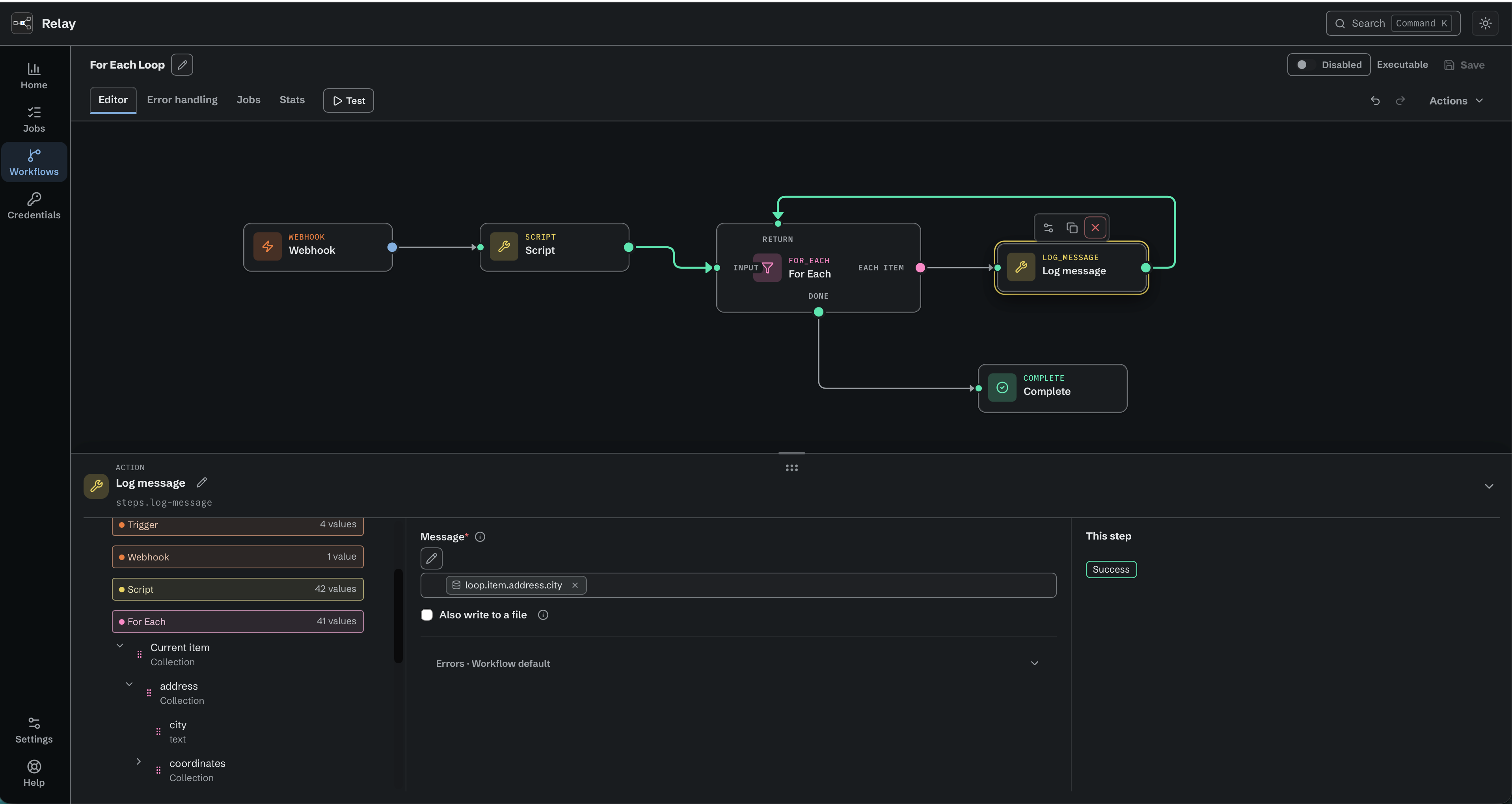
Each item returns to its For Each node; Complete follows Done.
7.3 Complete - End the workflow successfully.
No parameters. The job ends succeeded. Every path must reach a Complete or an Error; a path that stops at an action is a validation problem.
Inside Error handling, the Complete has a different meaning: it ends the handler, and the job stays failed (chapter 9).
7.4 Error - End the workflow with an error.
One parameter, Error message (optional, variables allowed). The job ends failed, and the job shows that message. Use it to fail deliberately on a condition - a Switch's Unmatched port leading to Error with the message Unexpected file type ${item.ext}.