
Chapter 5 / Building workflows
5. Triggers
A trigger starts a job. A workflow can have one or several triggers, and every trigger is armed and reported independently. Relay has six trigger types; each exposes facts about what started the job as ${trigger.…} variables (chapter 8).
Each trigger connects to the first action in its branch. Several triggers can start the same branch, or each can start a different branch in one workflow. At run time ${trigger.…} contains values from the trigger that started that job.
| Trigger | Starts a job when | Typical use |
|---|---|---|
| Watch folder | A file arrives in a folder and stops changing | Ingest, drop-folder delivery |
| Schedule | A time arrives | Nightly sweeps, hourly polls |
| Manual | An operator clicks Run now | One-off production runs |
| Webhook | An HTTP POST arrives | Another system calls Relay |
| SQS Queue | A message is read from an Amazon SQS queue | Iconik-originated work |
| Start Workflow | Another Relay workflow starts this one | Dispatcher → child workflows |
Triggers are armed only while the workflow is saved as executable and enabled. A disabled or draft workflow fires nothing.
5.1 Watch folder
Fires once per file that arrives and settles in the watched folder.
| Parameter | Default | Notes |
|---|---|---|
| Folder to watch * | - | The folder must exist. Relay does not create it. Browse picks from the Relay service's filesystem. |
| File patterns | empty (all files) | Comma-separated globs, e.g. *.mov, *.mxf. Empty accepts every file. Hidden files are always skipped. |
| Detection mode | Local folder | Local folder for local disks. Network share for SMB and NFS mounts, and required there. |
| Settle time (ms) | 500 |
The file must stay unchanged (same size and modification time) for this long before the job starts. Raise it for large files or slow transfers. |
| Watch subfolders | on | Also fires for files that settle in subfolders. Workflows saved before this option existed stay top-level until you re-enable them. |
What fires and what does not. Hidden files (names starting with .) never fire, even if a pattern would match them. Directories and symbolic links never fire. Each file fires once; Relay remembers it across service restarts. If the file is removed and a new file appears at the same path, that fires again. If a job cannot be started (the node is at its queue limit, for example), Relay retries at the poll interval until it succeeds; a settled file is never silently dropped.
Timing. In Local folder mode Relay reacts to filesystem events and starts a settle timer; polling continues in the background as a safety net. In Network share mode Relay scans at the node's Watch folder poll interval (Settings → Performance; default 1 s). When the workflow is enabled or the service starts, Relay scans the folder immediately, so files that arrived while Relay was down are picked up.
Accepted source. Relay uses the original watched file. Admission and queueing leave it at that path and do not create a private Relay media copy. Before an immediate, queued, or resumed job starts its first action, Relay checks that the original source is still the accepted regular file. A missing file stops with source unavailable. A file that changed, was replaced, or is now a symbolic link or Windows reparse point stops with source changed since it was accepted. Relay leaves the object then at that path untouched. Deliver a valid source again instead of substituting a different file.
Variables: ${trigger.path} (the file), ${trigger.name} (name with extension), ${trigger.basename} (name without extension), ${trigger.ext} (extension without the dot), ${trigger.folder.path} (subfolder path relative to the watched folder, empty at the root). The file is also ${item.path}, which is what actions use by default. Note that ${item.ext} includes the dot.
Network shares on macOS. A share mounted from Finder belongs to your login session; the Relay service cannot see it. Mount the share in a way the whole machine sees (the automounter, or a mount LaunchDaemon) and confirm with mount | grep smbfs after a reboot. Then set Detection mode to Network share and set Settle time (ms) from a timed copy of a typical file: at least twice the transfer time, and never below 30 s on a share. Relay does not mount shares or supply credentials for them.
Jobs from one watch folder run concurrently. Use Settings → Performance to cap them (chapter 12).
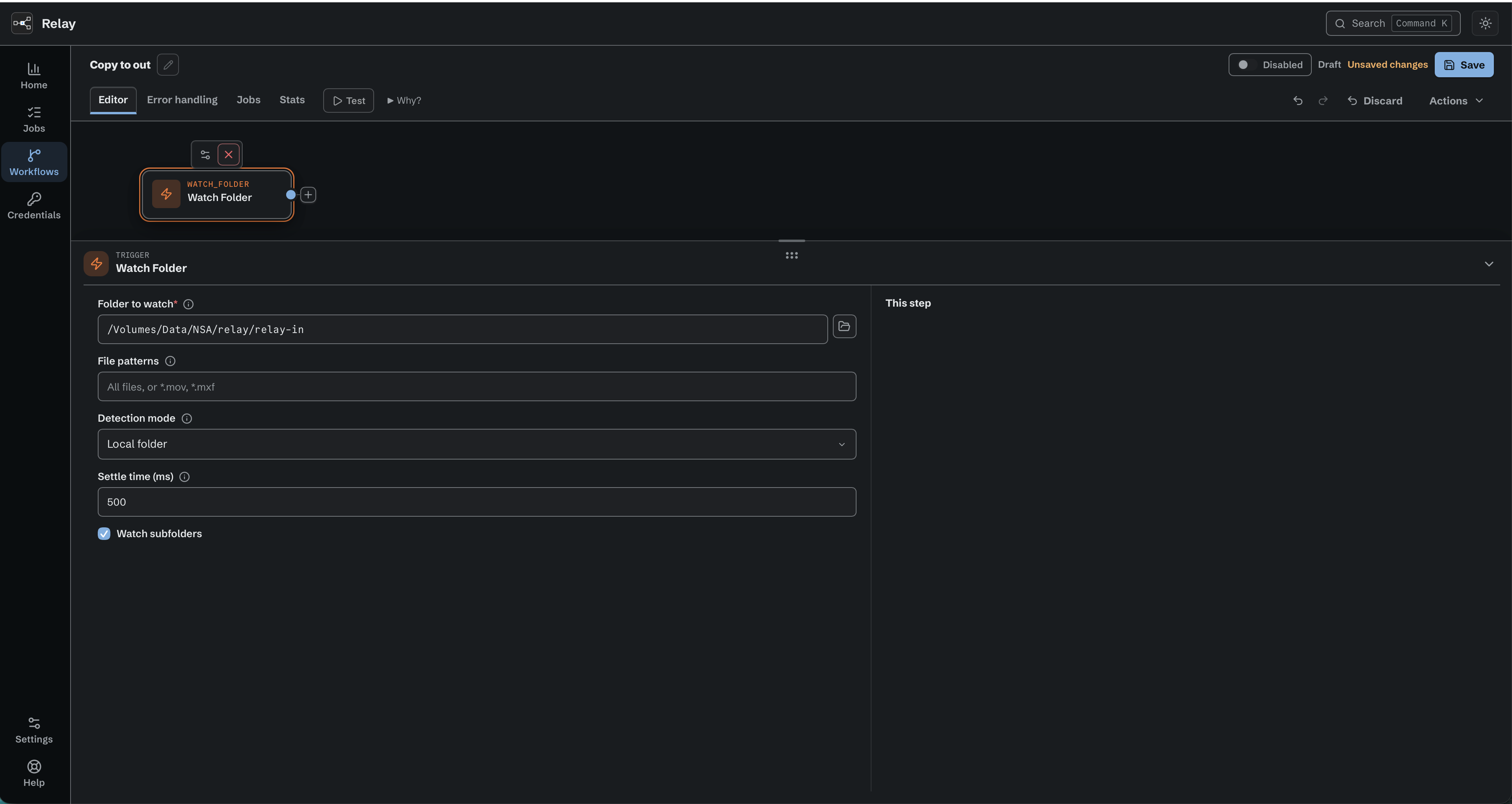
Watch folder starts a job when a file arrives in relay-in.
5.2 Schedule
Run the workflow on a schedule.
| Parameter | Default | Notes |
|---|---|---|
| Schedule * | Every N minutes | Every N minutes, Every N hours, Daily, Weekly, or Cron expression. The node's time zone is shown here. |
| Every (minutes) | 5 |
Shown only for Every N minutes. Range 1–59, aligned to the clock. |
| Every (hours) | 1 |
Shown only for Every N hours. Range 1–23, aligned to the clock. |
| At | 09:00 |
24-hour HH:MM in the node's local time. Daily and weekly modes. |
| Weekday | Mon |
Weekly mode. |
| Cron expression | - | Standard 5-field cron. @hourly, @daily, @every 90m, and a CRON_TZ=Area/City prefix are accepted. Node-local time unless CRON_TZ is given. |
Only the fields used by the selected mode are shown. Old workflows that used the earlier shared Every value keep the same behavior and are moved to the correct field when opened in the editor.
Occurrences missed while the machine was asleep or Relay was stopped are skipped, not replayed. Runs can overlap if one is still going when the next is due. Before save, the node bench previews the next run from the current draft or states why the schedule cannot arm. After save and enable, the same row reports live status.
Variable: ${trigger.scheduled_at} - the scheduled instant (not the moment the job actually started), with the schedule's local offset.
5.3 Manual
Runs when an operator clicks Run now. No parameters. Run now is available only for an enabled, saved workflow and starts the saved definition. It is a production job, counts in Stats, and does not disable the workflow. Use Test in the workflow header to run the current draft. Variable: ${trigger.invoked_at}.
5.4 Webhook
Start the workflow when it receives an HTTP request.
| Parameter | Default | Notes |
|---|---|---|
| Path * | generated UUID | The endpoint is POST /hooks/<path>. Letters, digits, . _ ~ -, 1-128 characters. Must be unique across enabled workflows. The editor flags other characters as you type. Generate path makes a new UUID. |
| Secret * | - | Callers send Authorization: Bearer <secret>. Use Generate secret, then Reveal secret or Copy secret while the new value is in the editor. It starts masked. After saving, Relay keeps only a hash and cannot show or copy the secret again. Generate a new value to replace it if needed. |
| Allow unauthenticated requests | off | Removes the secret check. While it is on, the editor warns: Anyone who knows the URL can start this workflow. Anyone who can reach the listen address and knows the path can start the workflow. For testing only. |
If the clipboard is unavailable, the editor reports the copy failure. Reveal the newly generated secret and select it to copy manually before saving.
The bench shows the full Endpoint URL to copy, and only once the node has confirmed it: while it is being read it says Loading endpoint, and if the read fails it says Endpoint unavailable with a Retry button. When the node's webhook listener is not running, the line under the URL says Not listening. Save and enable the workflow to receive requests. The line clears within a few seconds of the listener starting. Copy uses the operating system clipboard. If clipboard access fails, the error stays beside the URL and the URL remains selectable for manual copying. The listener address is a node setting (Settings → Webhooks; default 127.0.0.1:8787, which accepts only local callers - change it to a LAN address to accept calls from other machines; chapter 12).
Incoming requests. The bench also has an Incoming requests panel, closed by default and polling only while it is open, which is the fastest way to prove a caller is reaching Relay. It shows Loading requests on the first read, then a count such as 0 requests. When the feed cannot be read it shows Request feed unavailable with a Retry, and keeps the rows it already has. The last-updated time and Clear view appear once there are rows. Clear view hides the rows in this editor only: it deletes nothing and changes nothing for anyone else.
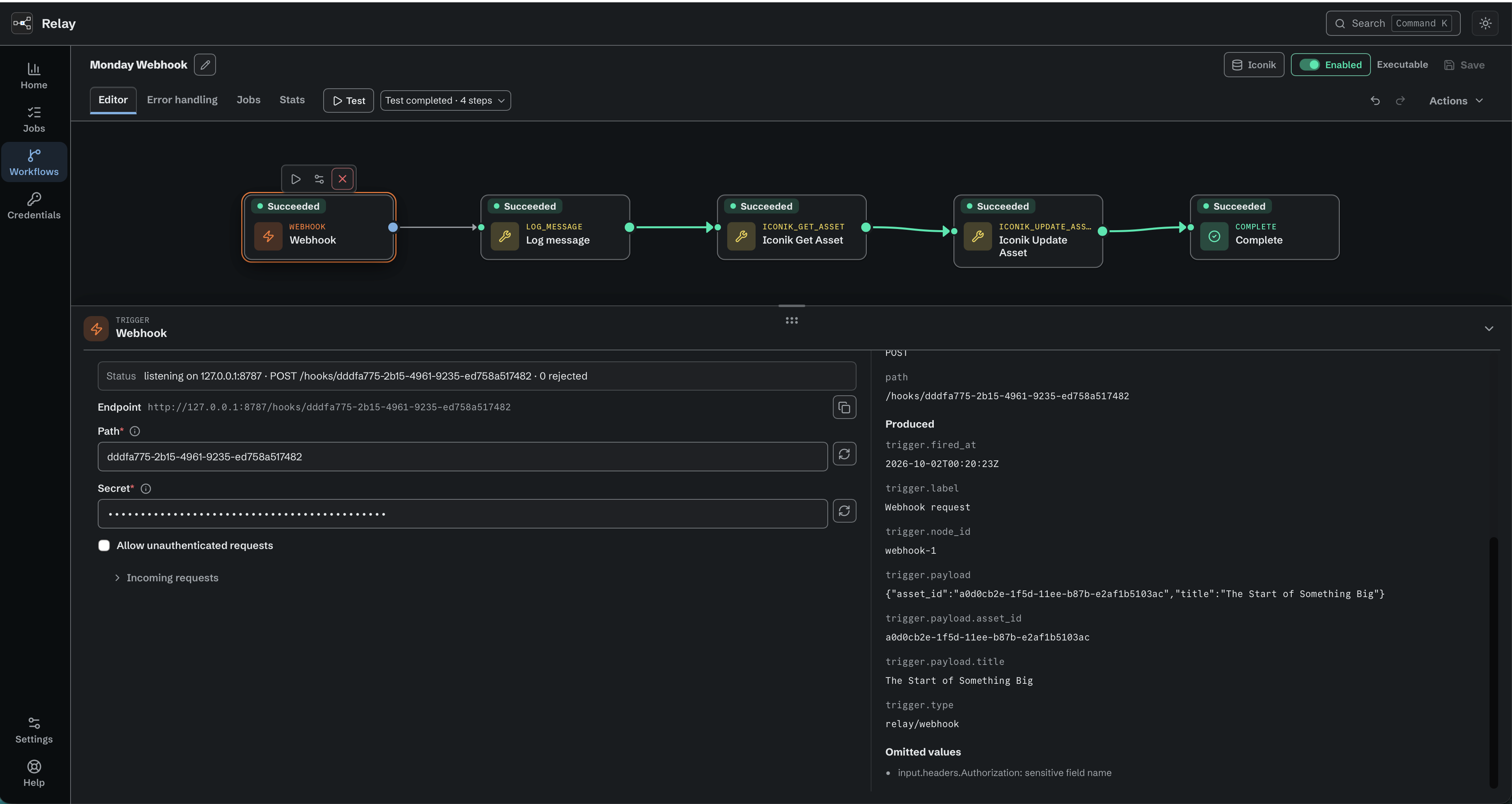
The Webhook bench shows its endpoint, masked secret, and recorded Test output.
Request rules. POST only. A body, if there is one, must be a single JSON value, at most 1 MiB; an empty or whitespace-only body is accepted and gives no ${trigger.payload} fields. Query-string parameters are accepted too. Relay answers immediately with 202 {"accepted":true,"workflow":"<id>"} (plus "run_id" if the job was queued rather than started at once). Other responses:
| Status | Reason |
|---|---|
| 401 | Missing or malformed Authorization: Bearer header |
| 403 | Wrong secret |
| 404 | No enabled workflow at this path (unknown, draft, or disabled) |
| 405 | Not a POST |
| 400 | Body is not valid JSON, or has trailing data |
| 413 | Body over 1 MiB, or the queued envelope over 256 KiB |
| 409 | A Workflow Test request is already claimed, or execution is refused because the workflow is invalid, draft, or unlicensed |
| 429 | This workflow's queue is full; retry shortly |
| 500 | Relay failed to durably accept the request because of a storage or infrastructure error |
| 503 | Relay is quiescing for maintenance (Retry-After: 5) or shutting down (no retry header) |
If the Relay service is down, nothing listens: the caller gets a connection error and nothing is queued or replayed later. Callers that need delivery guarantees should retry.
Variables. The JSON body and the query string are flattened under ${trigger.payload.…}: {"job":{"id":7}} gives ${trigger.payload.job.id} = 7; arrays are indexed from 0 (${trigger.payload.ids.0}). The body wins if a query parameter has the same name. ${trigger.payload} represents the complete JSON body. An object, array, or null root requires an input that accepts complete JSON. Select a nested scalar for a text input. Request headers are never exposed to the workflow. Chapter 8.4 has the full rules.
Testing a Webhook. Press Test, then send one request to the endpoint. Select the trigger to see the request in This step. Received shows the method, the path, and the headers as headers.<name>. Produced shows the trigger.* values later steps read. Relay never shows or keeps a header that can carry a secret, such as Authorization, Proxy-Authorization, Cookie, X-Api-Key, or any name that ends in token. It lists each one as omitted instead. Relay recognizes secrets by name and by known credential formats only, so check the evidence before you share it.
5.5 SQS Queue
Poll one verified External Queue connection without opening an inbound port.
One parameter: External queue *, chosen from the connections defined in Credentials under Amazon SQS (chapter 10.11). The picker lists verified queues by name. A saved queue that is no longer verified stays listed, followed by its status, for example Customer A intake (problem). The workflow stores the queue URL, so renaming the queue does not change the workflow. Relay polls the queue outbound; nothing needs to reach Relay from the internet. This is how Iconik sends work to a facility: Iconik → API Gateway → SQS → Relay.
Behaviour. Long-poll every 20 s, up to 10 messages at a time. Relay takes a message, records the job durably on the node, then asks SQS to delete the message, and only then does the job start running. The job's own record on the node is what keeps it safe from that point. Deletion does not have to have succeeded: if Relay cannot confirm it, the job still runs, and the message may reappear on the queue later. Relay's duplicate guard (chapter 10.11) is what stops a reappearing message doing the work twice, so set that window with this in mind. The message stays invisible to other consumers over that short claim-and-delete window, extended every 60 s if it needs to be.
A message goes back to the queue when Relay does not get as far as dispatching its job: the node stops first, the node's own queue is already full so the message is handed straight back, or Relay cannot extend the message's invisibility or delete it. Once the job is running, its message has already been deleted, so cancelling the job does not put anything back on the queue. FIFO queues are refused because jobs run concurrently and order is not preserved.
Message rules. The body must be a JSON object with non-blank system_domain_id and action_id. A system_domain_id that does not match the connection's Iconik System ID fails the job (the tenant guard). Within the connection's Prevent Duplicate Jobs window, a message with the same action_id and selection is recorded as a Blocked job instead of running again. Malformed messages become loud Failed jobs; messages that end up in a dead-letter queue are kept and are not replayed automatically.
Only one enabled workflow may poll a given queue. The usual pattern is one dispatcher workflow with an SQS Queue trigger that routes ${trigger.queue.job_type} through a Switch to Start Workflow actions, one child workflow per job type (see 5.6 and the external-queues deployment guide).
Variables: ${trigger.queue.payload} (raw Iconik payload), ${trigger.queue.headers}, ${trigger.queue.job_type}, ${trigger.queue.message_id}, ${trigger.queue.sent_at}, ${trigger.queue.receive_count}, ${trigger.queue.name}. The payload and headers are JSON-bearing values.
5.6 Start Workflow
Receive an internal Start Workflow invocation. No parameters. The workflow is started by a Start Workflow action in another workflow (Start Workflow), which passes an optional JSON body. Its Body accepts a complete JSON-bearing value, or an unquoted JSON-bearing value at a value position in an authored JSON template. The child runs as its own job, with its own history, and the parent does not wait for it.
Variables: ${trigger.start.payload} (parsed body, addressable like a webhook payload), ${trigger.start.body} (raw), ${trigger.start.parent_workflow_id}, ${trigger.start.parent_run_id}. The payload and body are JSON-bearing values.
5.7 Facts every trigger provides
${trigger.type}, ${trigger.label}, ${trigger.fired_at} (UTC), and - for graph triggers - ${trigger.node_id}.
5.8 Iconik Job
Available in the internal managed Iconik release. Older installers and evaluation builds do not offer this feature.
Start a run when someone clicks this workflow's Iconik Job action in Iconik. No parameters, and no poller: the trigger waits for clicks that Relay receives for an Iconik Job. An Iconik Job is a record on the node with a name, a job type key, one or both contexts (Asset and Bulk), an optional workflow, and an enabled state. Each click becomes exactly one job: the workflow starts, or Relay records one Failed job that never started, with an exact reason (chapter 9.7). You create and edit Iconik Jobs on Settings > Iconik (12.10). The trigger's panel lists the Iconik Jobs that use the workflow (4.9).
Which workflows qualify. A workflow can serve an Iconik Job when it has exactly one Iconik Job trigger and no Start Workflow trigger. A Start Workflow action is allowed, and so are other trigger types. It runs only when it is also saved as executable, enabled, and free of blocking problems. Relay checks both again for every click.
Variables: ${trigger.iconik.job_type} (Job type key), ${trigger.iconik.context} (Context, ASSET or BULK), ${trigger.iconik.payload} (Payload: the request body exactly as Iconik sent it), and ${trigger.iconik.user_name} (Started by: the name of the Iconik user who clicked, or that user's Iconik user ID when the name is not available). The payload is a JSON-bearing value. These are the only values from the click; headers never reach the workflow (chapter 8.10).
Workflow Test. A Workflow Test on this trigger waits up to ten minutes for one click on the custom action of an enabled Iconik Job that uses the workflow (4.6). The click feeds the Test with the four values above and starts no normal job. Relay keeps a protected copy of the click as a Test input, so you can Replay it without a new click. A Replay is not an Iconik job, and its trigger.iconik.user_name comes from the Test that kept the input.
For setup, eligibility, testing with a click, and what to check when a click does not start the workflow, see the Iconik Jobs guide in the Relay guides library.