
Chapter 14 / Operating Relay
14. Multi-node
One Relay editor can manage Relay services on several machines - a Mac Studio in the machine room, an Ubuntu server beside the storage. Each machine is a node. Each node keeps its own workflows, credentials, job history, queues, backups, performance limits, and license; the editor is a window onto whichever node you select.
14.1 What a remote node needs
-
macOS 14 or later, or Ubuntu 24.04, with Relay installed and licensed on that machine (chapter 2; chapter 13.3 for the Ubuntu command line).
-
SSH access for an existing administrator account that can use
sudo. -
The Relay service grant, installed once on the node by an administrator. The script that installs it,
install-relay-service-grant.sh, is not part of the Relay installation: ask North Shore Automation for it, copy it to the node, then run it from the folder you put it in:sudo ./install-relay-service-grant.sh --account <account>This writes
/etc/sudoers.d/relay-service-control. It authorizes only Relay service status, start, stop, and restart for that account - no shell, no software installation, no license, firewall, or SSH changes. Remove it with--remove.
Enrolment itself installs nothing on the node, adds no keys, and never asks for or stores an administrator password. Windows machines cannot be remote nodes; a Windows Relay is managed only from its own editor.
14.2 Adding a node
Settings → Advanced → Nodes → Add node.
- Fill in Name, Host, Account, and Platform (Mac or Linux). Port and SSH key file, optional are under an SSH options disclosure: open it to change the port from 22 or to Browse to a private key. Relay can connect without a key file when your SSH agent already holds the key.
- Test connection. Relay checks Reachability, Authentication, Machine identity, Relay, Service, and Compatibility, each reported as Passed, Failed, Stopped, or Waiting for you.
- On first contact Relay shows Confirm this machine identity with the host key fingerprint. Verify it on the machine itself, not over this connection: run
ssh-keygen -lf /etc/ssh/ssh_host_ed25519_key.pubthere and compare character for character. Then Approve this machine identity. - Add node.
If a node's host key changes later, Relay refuses to reconnect - This machine identity changed - and will not re-trust it from the editor. If the machine was rebuilt on purpose, remove the node and add it again: that is what clears the identity Relay recorded, because Relay keeps its own private record and never reads or writes your ~/.ssh/known_hosts. Copy command offers ssh-keygen -R <host> for your own SSH client's records, which is worth doing if you also connect to that machine by hand, but running it alone does not change what Relay trusts.
Connection states shown in the list: Connecting, Ready, Stale, Authentication refused, Machine identity changed, Wrong account, Service stopped, Incompatible, Disabled, Removal cleanup pending, Not yet observed.
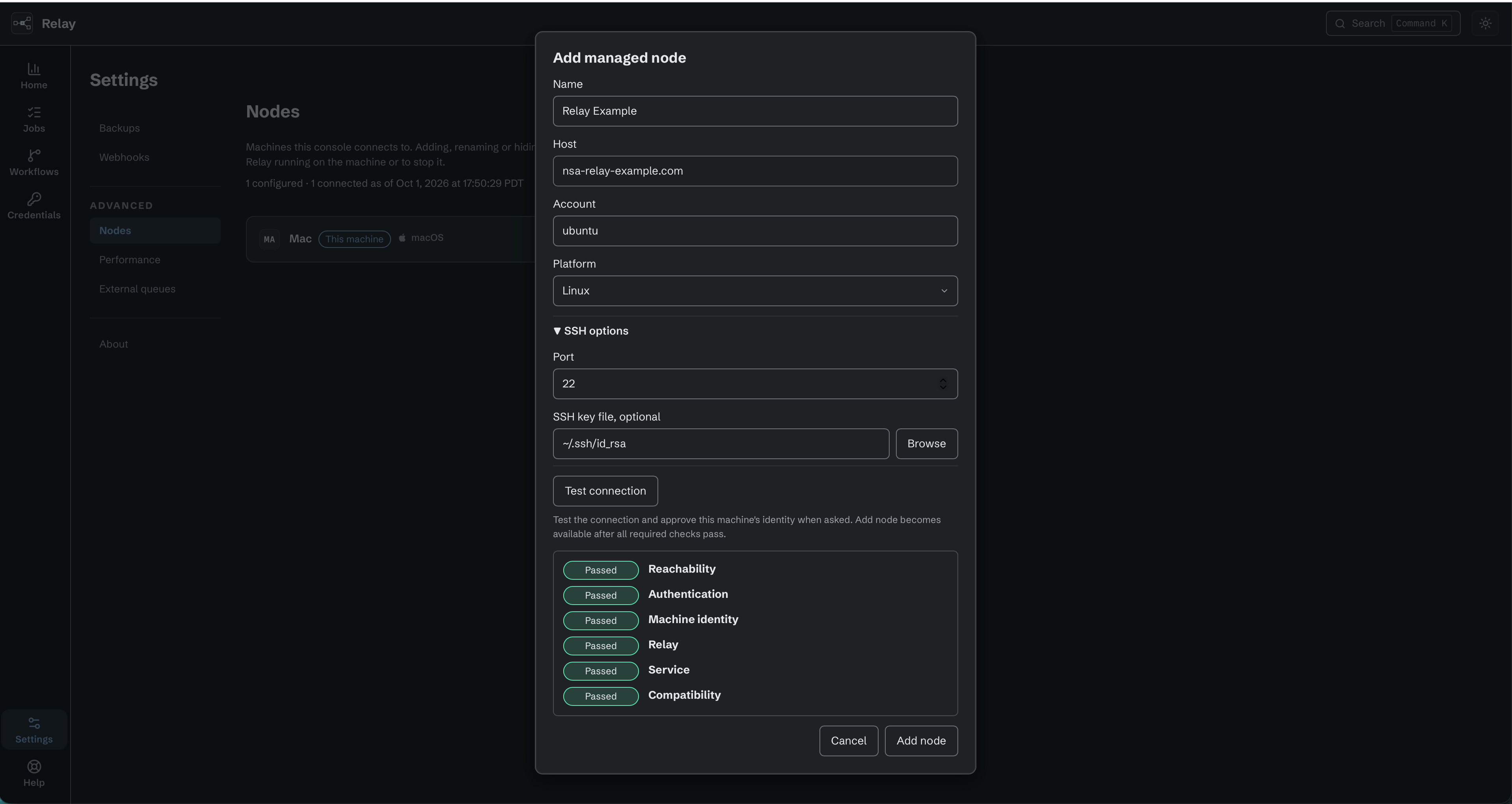
Add a remote node using its address, account, and SSH connection settings. All required checks must pass before adding it.
14.3 Working across nodes
Disabled actions and older versions. The selected node must support disabled actions before you can change an action's state. Use a current console when editing or testing a workflow that contains disabled actions. The node refuses Save and Test from an older console to preserve those states. Update the console, then reopen the workflow. Other workflows without disabled actions can still be saved and tested.
With two or more nodes visible, the top bar shows a node context pill. All nodes turns Home into the fleet dashboard: Live jobs (active and waiting-to-retry jobs across the fleet), Queued, Unreviewed errors, Completed with warnings, a Fleet health line (N machines · N connected · N unreachable · N need attention), and a Machines card per node. The activity list groups Failed, Completed with warnings, and Live jobs so an operator can review mixed loop results separately from failed work. A card stays quiet when the machine is healthy: it shows the machine's identity, its status chips, and what it is working on, and nothing else. The service state, the license, the Relay version, and the connection state appear on the card only when one of them is worth your attention, and the version only when it differs from this console's. Actions such as Open, Start service, Fix connection… and Review queue appear with the problem they answer. Review queue opens that machine's Home, where the Workflow queues controls are (11.6). A node that is not reporting is counted as unknown, not zero. Each node's license line follows the build that node reports: a licensed Windows, Ubuntu or macOS node reads Production licensed and appears in Needs attention when its license blocks work, while a node on the evaluation build reads Evaluation build and raises no license alert.
Select a machine from the pill to work on it. Opening a workflow narrows the context to its node. Switching nodes with unsaved edits prompts: Unsaved changes stay behind with <machine> - Save and switch or Discard and switch.
Workflows are not shared between nodes. To copy one, Export it from the source node's Workflows list and Import it on the target (chapter 4.7). Before import, create each required credential on the target with the same type and display name it has on the source node.
You can select and export several workflows into one archive. Import can read one or more archives and reviews each workflow before changing the target node. Existing workflows are never overwritten: choose Skip or Copy for each conflict. A missing or ambiguous credential match makes a workflow invalid for import. Imported workflows arrive Off, and Relay lists any trigger secrets that must be restored. An older remote node keeps these controls unavailable and asks you to update the node first.
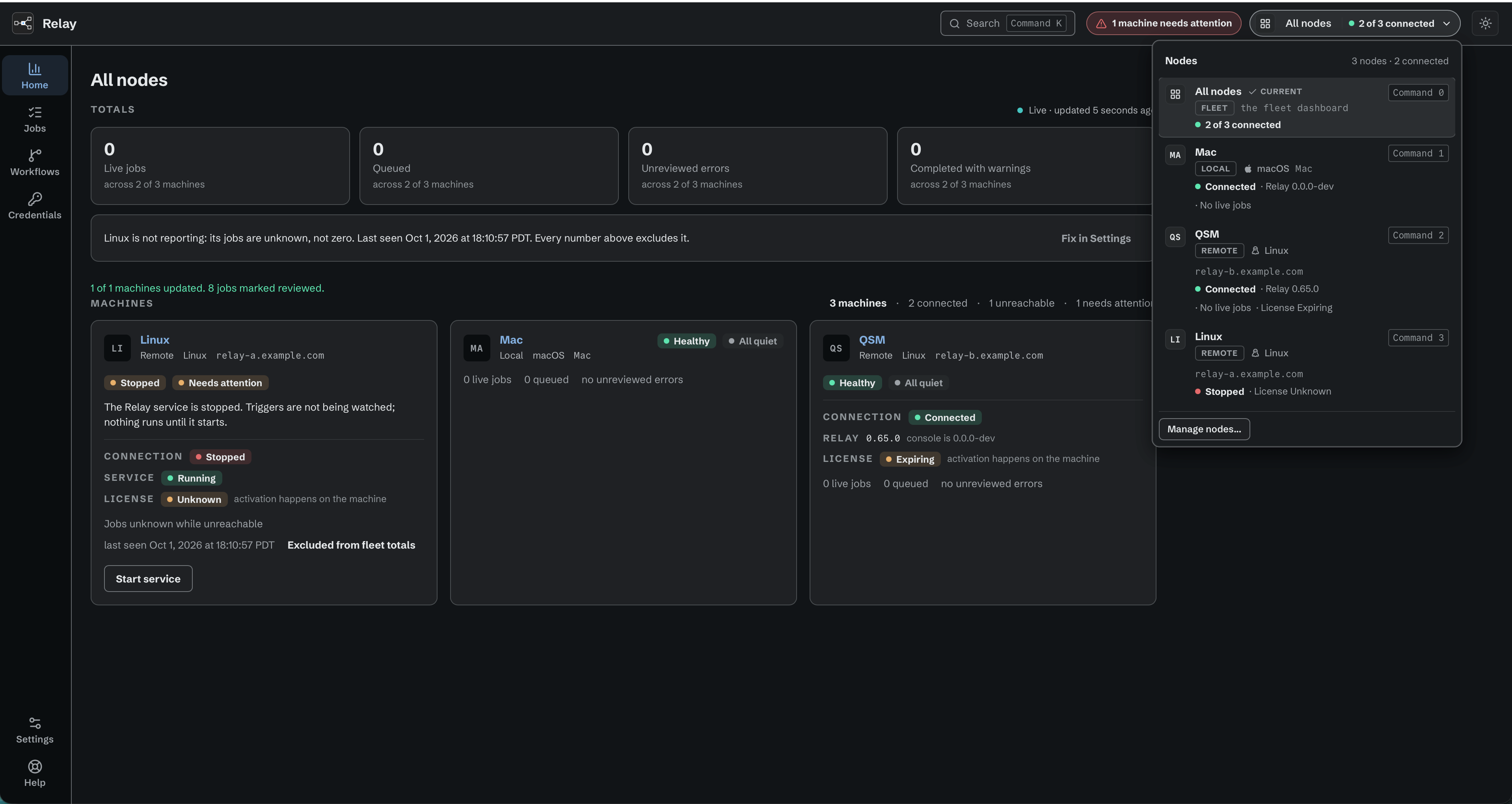
All nodes shows fleet health and the machines that need attention.
14.4 Service control
Each node's service panel offers Start, Stop, Restart, and Disable / Enable (disable stops the service and keeps it stopped across reboots). Stop and Restart warn about live work. Active running work is interrupted and does not resume where it stopped. A waiting retry is named separately: it keeps its saved progress and original recovery limit. After Relay starts, it checks saved retries, resumes eligible requests, and follows error handling when recovery expired. Other interrupted jobs are recorded with that status (chapter 11.1).
If the editor sends a command and never sees the result, it says Unknown result; check the node's state after a moment.
14.5 Hiding, removing, forgetting
A node's Node actions menu offers Edit connection, Hide node (or Show node), and, for a remote node, Remove node.
Hide takes the machine out of this console's lists and counts. Nothing on the machine changes: Relay keeps running there, its workflows keep running, and its connection settings are kept. Confirm with Hide it; Show node brings it back with no confirmation.
Remove node asks the real question, and gives two answers:
| Choice | What it does |
|---|---|
| Forget | The machine leaves this console only. Relay keeps running there and its work carries on. This console loses its connection and cannot stop the machine afterwards. Nothing is sent to the machine. |
| Remove | Relay is stopped on the machine first, ending its live jobs and holding its queued ones, then the machine leaves this console. |
The confirmation states how much live and queued work the machine has, as of the time it read them. Neither choice uninstalls Relay or touches its license, and workflows, credentials, and run history stay on the machine either way. Cancel holds the keyboard when the dialog opens, and after a successful Forget or Remove the keyboard moves to Add node, because the row it came from is gone. A failure is reported inside the confirmation, where you can read it.
When the console cannot reach the machine, it says so - This console could not read what <machine> is doing, so its live and queued work is not known - and Remove is shown but unavailable, because Relay cannot be stopped on a machine the console cannot read. Forget is still one click away, and warns that Relay may still be running there beyond this console's control. If you need that machine stopped, tidy it up by hand.
A removal that could not finish leaves the node showing Removal cleanup pending, with Retry cleanup and, for a remote node, Forget. The standalone Forget asks for a deliberate confirmation, I understand, forget it, because Relay may keep running unmanaged on that machine afterwards.